- My Workflow Supercharged: How Gemini CLI Revolutionized My Vibe Coding
- 🚀 My Journey from Blog Post Headache to a Homemade CMS: Embracing the “Good Enough” Solution
- 💥 The rm -rf Debacle: How I Accidentally Deleted My Entire Project (and Built a Better One)
- The “Before”: A Tragic Story of rm -rf
- The “After”: Rising from the Ashes (and Cloning from GitHub)
- 1. 🤝 CMS Local Integration (Phase 1: Getting Connected)
- 2. 🔒 Security Overhaul (Phase 2: Ditching the Hardcodes)
- 3. ✨ Styling and UX Fixes
- 4. 💾 Version Control (The True Safety Net)
- 🚀 Conclusion: Ready for Deployment
- Update: VPS Woes, CMS on Hold, and a New Career Path Project!
My Workflow Supercharged: How Gemini CLI Revolutionized My Vibe Coding
November 11, 2025
I don’t consider myself a traditional coder who builds or knows everything to build from scratch. I like to be the orchestrator, the one who has the vision and directs the tools to bring it to life. For a while, my process for building this website was anything but grave. It was a slow, boring, and manual grind.
It started with an idea and a conversation with the Gemini web chat. I’d get a block of code, copy it into VS Code, make some minor changes, and then manually upload the files to my server. Every single change, no matter how small, required the same tedious process. It was a workflow that killed momentum and pushed creative ideas to “tomorrow.”
Then, everything changed. I stumbled upon a Network Chuck video about running Gemini directly in the terminal. This wasn’t just a small improvement; it was a paradigm shift.
This is what I call “supercharged vibe coding.”
My new workflow is built on a simple philosophy: the best way to learn quickly is to fail fast. The Gemini CLI, combined with Git, has become the engine for this philosophy. Now, I can have an idea, conceptualize it, prototype it, deploy it, test it, find the issues, and repair them at a speed I never thought possible. The frustration is gone, replaced by a dopamine rush that has me coding at 1 AM, excited to build out my homelab and website through the night.
My process is a continuous loop:
- Local Changes: I make changes to the site on my local machine.
- Local Preview: I run a local Jekyll server to see how it looks and feels.
- Push to Git: Once I like what I see, I ask my Gemini agent to commit and push the code to GitHub.
- Automated Checks & Deployment: A GitHub Actions workflow automatically tests the build. If everything is working as it should, it deploys the site directly to my hosting server.
Of course, sometimes things don’t go as planned. A build fails, and an error pops up. But that’s no longer a roadblock. I copied the error log, pasted it into my Gemini-CLI, and asked, “What’s happening here?” Most of the time, it’s something silly that gets solved right there and then.
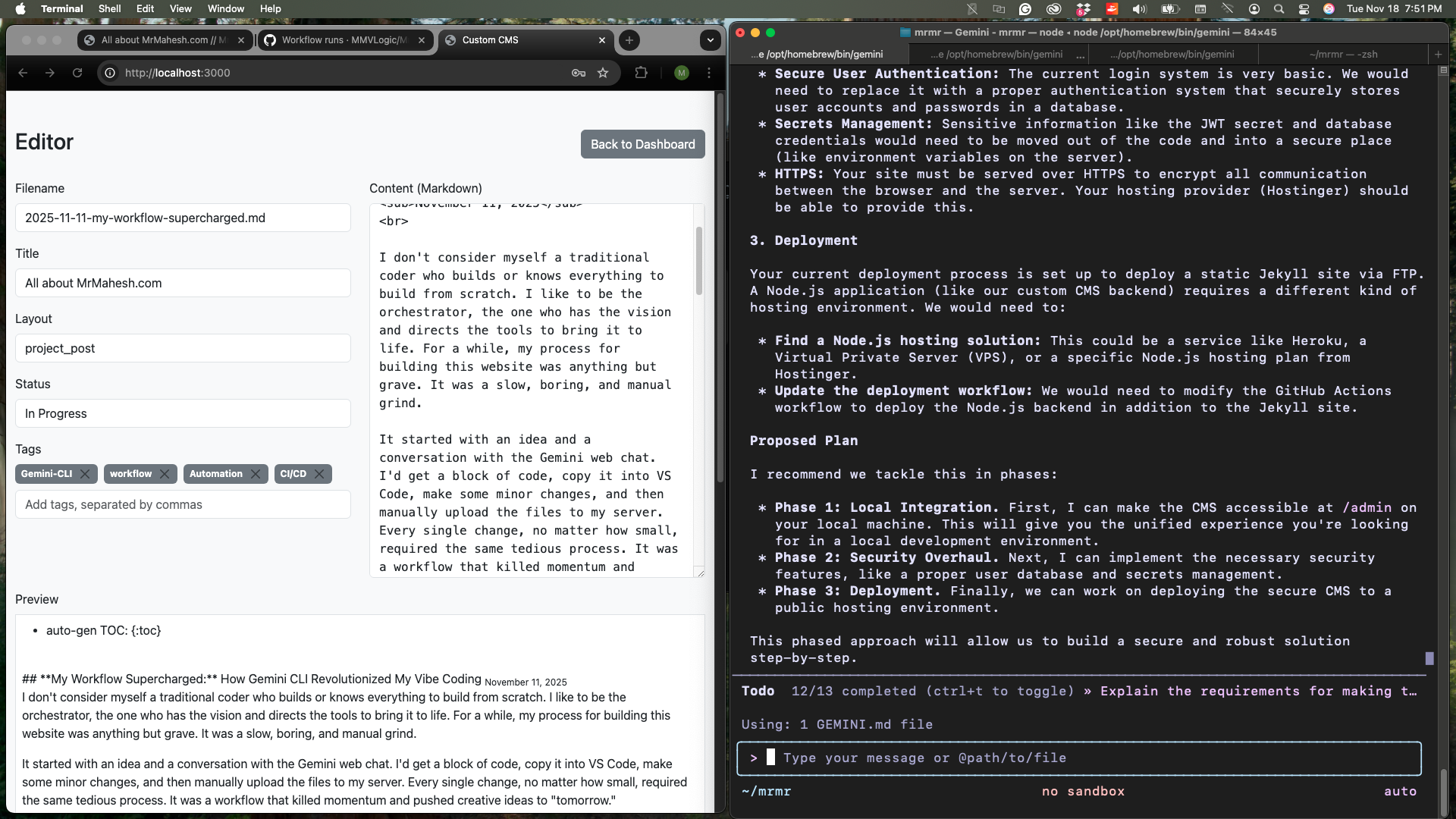
It hasn’t all been smooth sailing. I hit a major wall when I tried to implement a web-based Content Management System (CMS) so I could write posts from a web interface. I spent a lot of time with my agent trying to figure out why it wouldn’t work. I still suspect it has to do with the limitations of my basic hosting plan, but it was a valuable lesson in understanding the boundaries of my environment. We also wrestled with a search bar that initially appeared on every page before we managed to isolate it to just the projects page.
Each challenge, however, is just another lap in this rapid-fire learning cycle. With an AI system that can keep up with my ideas, I’m no longer just a user—I’m an orchestrator, turning concepts into reality at the speed of thought.
Alright, the dopamine is wearing off, and my bed is calling. It’s time to sign off.
🚀 My Journey from Blog Post Headache to a Homemade CMS: Embracing the “Good Enough” Solution
November 19, 2025
Hey everyone!
If you’ve been following my little corner of the internet, you know this site’s main mission is simple: to share my IT adventures and homelab hiccups. I’m a firm believer in documenting the real process—thoughts, actions, and especially the mistakes and fixes. Lately, I’ve had to press the pause button on my actual homelab projects, and here’s why: I needed to make the process of uploading these write-ups as easy as humanly possible.
The “Before”: A CMS Nightmare
My core issue is that I’m a CNC Machinist by day and a wannabe DevOps engineer by night, not a professional website builder! I don’t have the time—or the patience—to dive down endless rabbit holes to figure out simple tasks.
The Initial Plan (and Why it Failed)
My original thought, bless its naive heart, was to explore an existing solution. The first suggestion, courtesy of Gemini, was to explore Netlify CMS.
🤦♂️ The Problem:
It was the same reason I prefer using gemini-cli to design my site over a drag-and-drop builder: I don’t want to spend my precious few hours of “night-shift” learning concepts I might only use once or twice. When I’m forced to use a pre-built tool, I end up spending all my time asking an AI how to make that specific software do what I want. That time could be spent on my actual projects! Plus, what if the software gets a new version? My trusty AI might not even know the new commands yet.
For me, the best way to work is to ask Gemini how to do something according to industry standards, then I choose the path, and finally, I write a script for repeated tasks.
The Pivot to “Good Enough”: My Hand-Curated CMS
Failing to get Netlify to work in a way that didn’t feel like a time-suck, I decided the solution had to be homegrown and minimalist. I needed something that let me spend 90% of my time writing the post and 10% on publishing it.
I didn’t create a CMS—I curated one. It’s a simple system that logs into my admin dashboard, where I can manage existing posts and draft new ones. Since all the webpage design is stored in a layouts folder, every new post automatically gets the same look, even if I publish a thousand of them! My job is now just to focus on the Markdown.
Building Security: A Tangent on Hashing and Salt
My first version had the username and password stored in plain text. It was only running on my private server, but the moment I thought, “What if this gets pushed to Git?” I spiralled into a new learning rabbit hole (a fun one this time!).
Here is my simplified, amateur-level understanding of what I implemented:
• Before: username: password (😱)
• After: The Magic of Hashing and Salt
- When I set my password, a unique, random salt is generated.
- The salt is combined with my password, and the resulting mess is turned into a one-way hash (using bcrypt). This hash (which includes the salt) is what gets saved.
- When I log in, the system grabs the stored salt from the hash, combines it with my entered password, and re-hashes it.
- If the new hash matches the stored hash, I’m authenticated! Sprinkling that salt makes a massive difference in preventing dictionary attacks.
I also set up JSON Web Tokens (JWT) for session management. Now, once I’m logged in, that token handles subsequent requests, so I don’t have to keep re-entering credentials. It all runs off a single .env file since I’m the only user. Simple, secure (enough!), and effective.
The Final Messy Lesson (and a Reminder about CI/CD)
After all that security work, I made a classic mistake: I forgot to add the .env file to my .gitignore list. 🤦♂️ That’s the beauty and the curse of a CI/CD pipeline—it lets you roll back mistakes, but anyone can also go into your old workflow runs to see past errors.
So, tonight’s agenda includes running BFG Repo-Cleaner to wipe the old repository’s history clean.
It’s been a long night of coding and fixing my own mistakes. Being a CNC machinist by day and trying to be a DevOps engineer by night is exhausting. I’m certainly not cash-loaded like Bruce Wayne to be a vigilante all night, but every little solved problem feels like a small win!
See you in the next post (which, thankfully, will be much easier to write and publish!).
And I’m back at square one. I accidentally removed my root directory, from which I was working. Thanks to rm -rf mrmahesh, I had to edit and commit directly to the GitHub repository from the mobile app, as I was at my day job. Surprisingly, a lot can be done on the app.
💥 The rm -rf Debacle: How I Accidentally Deleted My Entire Project (and Built a Better One)
November 29, 2025
This one’s going to be a little personal. You know those moments when your stomach drops because you just did something incredibly stupid? Yeah, I had one of those. And I learned a hard lesson about the power of three little letters: rm.
The “Before”: A Tragic Story of rm -rf
As I mentioned in my previous post, I was in the midst of a deep clean operation on my GitHub repository. Everything was going smoothly, right up until the very final step.
My plan was simple: remove the .git directory from a specific subfolder. My actual command was supposed to look something like this:
rm -rf mrmahesh.com/.git
But in a moment of finger-fumbling madness, my terminal read:
rm -rf mrmahesh
And I hit Enter.
mrmahesh is my root directory. The one with literally everything in it. I realized the mistake right at the second the key clicked, but it was too late. When you delete a file by dragging it to the trash, it goes to the Recycling Bin—a nice little safety net. But when you use rm -rf (remove recursively and forcefully), that file is gone forever. Poof! The entire project, all my hard work, vanished into the digital ether.
The “After”: Rising from the Ashes (and Cloning from GitHub)
After a moment of pure panic (and a quick chat with Gemini for some damage control), I pulled myself together. Thanks to the magic of Git, all was not lost—the last committed version was safe on my remote repository!
My new approach was simple: Clone the repo and start building back everything I had lost, but this time, better. Since I had already built the system once, I knew all the pitfalls. This second attempt was my chance to nail it.
Here’s the summary of the rebuild, organized into new, more robust phases:
1. 🤝 CMS Local Integration (Phase 1: Getting Connected)
The core challenge here was connecting my Jekyll frontend (my website, which runs on something like localhost:4000) with my CMS backend (where I edit the content, which runs on something like localhost:3000).
Think about it: when you visit mrmahesh.com and want to edit a post, you shouldn’t have to go to a completely separate, secret address to do it! The goal was a unified local development experience.
- The Solution: We used CORS (Cross-Origin Resource Sharing) to allow the frontend and backend to talk nicely to each other, even though they were on different “ports” (the numbers after the colon in the address).
- Serving the Files: I configured my Jekyll site to serve all the CMS files (HTML, CSS, JS) from an
/admindirectory, making the whole thing feel seamless. - The Tricky Bit (and Fix!): I ran into a head-scratcher where Jekyll wasn’t automatically rebuilding the site when I saved changes in the CMS. Turns out, I just needed to restart the Jekyll server with the
--force_pollingflag. Lesson learned: never skip the man page!
2. 🔒 Security Overhaul (Phase 2: Ditching the Hardcodes)
The initial version was super basic and, frankly, insecure. If I’m prepping for deployment, this had to be fixed! The old version had a hardcoded username and password—a big no-no.
- Database-Backed Auth: We completely ripped out the old system and implemented proper database-backed authentication using sqlite3. This means user accounts are now securely stored, not written in plain sight.
- User Management: I created a default admin user and built the foundation to create more user accounts in the future.
- Environment Variable Cleanup: I cleaned up my environment variables, getting rid of those old, hardcoded credentials and adding a new
DATABASE_PATHvariable to make things configurable. Much safer and more professional!
3. ✨ Styling and UX Fixes
While deep in the code, I fixed a few visual annoyances that had been bugging me in the original build:
- Figure and Caption Styling: My image captions (like the italics) weren’t showing up correctly! I tracked it down to the main stylesheet not loading properly in the site’s layout. A simple fix, but a huge aesthetic improvement.
- Improved Readability: I slightly increased the line and paragraph spacing across the entire site. It’s a small change, but it makes the content so much easier on the eyes.
4. 💾 Version Control (The True Safety Net)
Finally, and perhaps most importantly, I made sure to save all this amazing progress! I pushed the changes to GitHub in a series of well-documented commits. No more frantic, last-minute pushes for me.
🚀 Conclusion: Ready for Deployment
In short, the universe forced me to hit the reset button. But because of that terrifying rm -rf, I’ve taken a basic, insecure proof-of-concept and rebuilt it into a robust, secure, and feature-rich system. It’s now officially ready for the final boss: Phase 3: Deployment (Frontend, Nginx, and the whole shebang!)
I’ll dive into the deployment phase next. Wish me luck—and please, double-check those terminal commands!
Update: VPS Woes, CMS on Hold, and a New Career Path Project!
December 19, 2025
Quick update from the homelab front! As you know, I’ve been working on getting my custom Node.js CMS up and running, aiming for that seamless localhost:4000/admin integration. While the local setup is coming along nicely, the reality of deploying the Node.js backend to a live server has hit a bit of a snag.
The VPS Dilemma
My current hosting plan is fantastic for static Jekyll sites, but it doesn’t support Node.js. This means if I want my CMS to be publicly accessible, I’m going to need some form of a Virtual Private Server (VPS). My initial thought was to leverage the generous free tier offered by Oracle Cloud. It seemed like a perfect fit to get a proper Node.js environment without immediate costs.
Oracle Cloud: The Waiting Game
Unfortunately, my request for an Oracle Cloud Free Tier instance has been stuck in “pending” status for what feels like an eternity – 17 days and counting! This delay is preventing me from moving forward with the public deployment of the CMS, which is a bit frustrating.
CMS Local, For Now
Given the indefinite wait with Oracle Cloud, I’ve decided to press pause on the public deployment of the CMS for now. I’ll continue to run it locally, enjoying the benefits of a smooth content creation workflow in my development environment. The goal of having a fully integrated, publicly accessible CMS is still there, but I’ll revisit the VPS hosting options later. Sometimes, the best way forward is to acknowledge a roadblock and pivot.
New Horizons: Reverse Engineering Career Paths
Speaking of pivoting, I’m excited to announce my next big project! I’m going to dive deep into reverse engineering someone’s career path for targeted role emulation. The idea is to break down successful careers in roles I aspire to, understand the milestones, skills acquired, and strategic moves made, and then develop a personalized roadmap to achieve similar success.
This involves a lot of research, data analysis, and strategic planning – skills I’m keen to hone and apply. It’s a project that combines my analytical mindset with my career aspirations, and I think it will yield some incredibly valuable insights.
So, while the CMS is taking a brief local vacation, stay tuned for updates on this new career path exploration! It’s going to be an interesting journey.
Until next time, keep building and keep learning!
MM